.svg)


How to Fix 6 Top Customer Journey Pain Points Before They Become Churn Points

Ecommerce leaders like you may have a daily habit of checking on critical metrics like CAC, ROAS, and LTV. And when they need improving, you might tweak ad copy or create a new post-purchase email flow to encourage repeat purchases.
In reality, a rise in CAC or a decline in ROAS or LTV could be due to overlooked customer journey pain points. These aren’t major technical issues but minor disruptions in the overall customer experience that have an oversized impact on conversion rates and customer loyalty.
In an analysis of “2024 online experience data,” Contentsquare found that conversion rates dropped “6.1% year-over-year.” One reason for the decline was “the challenge of meeting customers' growing demands for faultless interactions.”
In this article, we’ll look at five frustrating types of pain points in ecommerce and offer best practices for fixing them.
Pain point #1: Dead end site searches
Suppose you’ve optimized your social media ad copy and boosted your ad spend, which results in a slew of prospective customers landing on your site. A handful of them type what they want into your search bar, and the response is “0 Results Found” or “Out of Stock.” Both are negative experiences.
Some popular products may in fact be sold out. But it’s also possible the shopper has searched for a product using a synonym, a misspelling, or a descriptor that your site’s native search engine doesn't recognize.
If the shopper knows the product should be there, and you say it’s not, they’re likely to leave your site all together. That’s both ad spend and customer satisfaction down the drain.
The Solution: NLP-fueled Semantic Search
These days your site must be smart enough to recognize that a query for “runing stuff” or “running gear” is really a search for products like “shoes,” “shorts,” and “singlets.”
Algolia is a powerful tool that uses Natural Language Processing (NLP) to understand intent. The system will also recommend complementary products that other shoppers have purchased with the searched-for item. New customers will find what they need, and you’ve encouraged them to boost the amount of their first order.
But in cases where you really don’t have or are out of a particular product, design a “No Results” page that keeps potentially disappointed shoppers on your site.
In place of the unavailable item, display your current "Best Sellers," "New Arrivals," or "Categories You Might Like." Introduce these options with this more helpful web copy: “We couldn't find an exact match for [searched for product], but you might like these popular items.” This phrasing is much more inviting than “0 Results Found.”
Pain point #2: No cross-device integration
Today’s ecommerce customer journey often plays out across multiple devices. Say a shopper visits your site on their phone during lunch and adds items to their cart, with plans to check out on their laptop when they get home.
Customer frustration takes hold when the shopper opens their laptop and heads to your site, only to find their cart empty. Why? Their session data didn't transfer between devices. Sure, some shoppers will grudgingly refill their cart, but many will not. In the brutally competitive ecommerce world, can you afford to give up even the tiniest competitive edge?
The solution: Implement an “email my cart” feature
Shoppers who create accounts can log in on their various devices to keep track of their carts. But for as many shoppers who create accounts, a good number will prefer to check out as guests. This crowd won’t become account-holding customers unless you nail their cross-device experience. The best way to satisfy them is to offer an “email my cart” feature.
Simply place an easy-to-find button in the shopper’s mobile cart view. Label the button "Save this bag for later." When clicked, the user enters their email and they receive a direct link to their pre-filled cart. The user can shop from the email once they open their laptop.
Consider Home Depot. The company lets shoppers create lists of desired products and email those lists to one or more recipients:
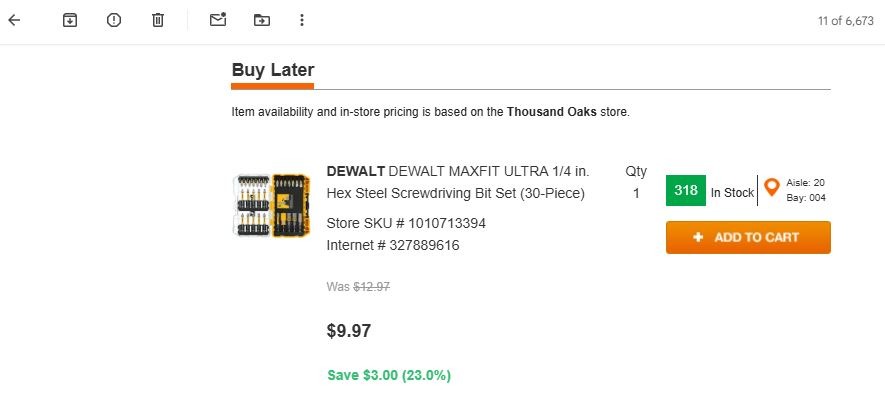
Besides the obvious benefit of keeping track of the items in a shopping cart, the “email my cart” feature captures a high-intent email lead for your flows.
Pain point #3: Silence after “order confirmed” email
Customer-facing order tracking information has moved beyond table stakes. If it’s not a part of your post-purchase email flows, you’ve given shoppers a good reason to churn after one order.
But even if you do provide it, you might not be updating customers frequently enough. According to 2025 research from logistics intelligence provider Sifted, “63% of consumers consider full visibility throughout the delivery process to be essential.” Sifted doesn’t define “full visibility,” but if you’re not making it easy for your customer base to check the status of a shipment, you could be behind the curve.
Without shipping updates at key moments, you open your company to more WISMO (“Where is my order?”) inquiries. These aren’t bad in and of themselves. But if you’re not ready for them, your already taxed customer support teams could see their workloads increase.
Help keep your support agents happy and satisfy customer expectations with this solution.
The solution: Risk overcommunication with shipping email / SMS updates
Once an order ships, you send the customer an email or SMS message containing tracking information. But if the package won’t arrive for a week or more, these early messages get pushed farther down shoppers’ feeds. It soon becomes more inconvenient for shoppers to search for these messages if they want to track their package.
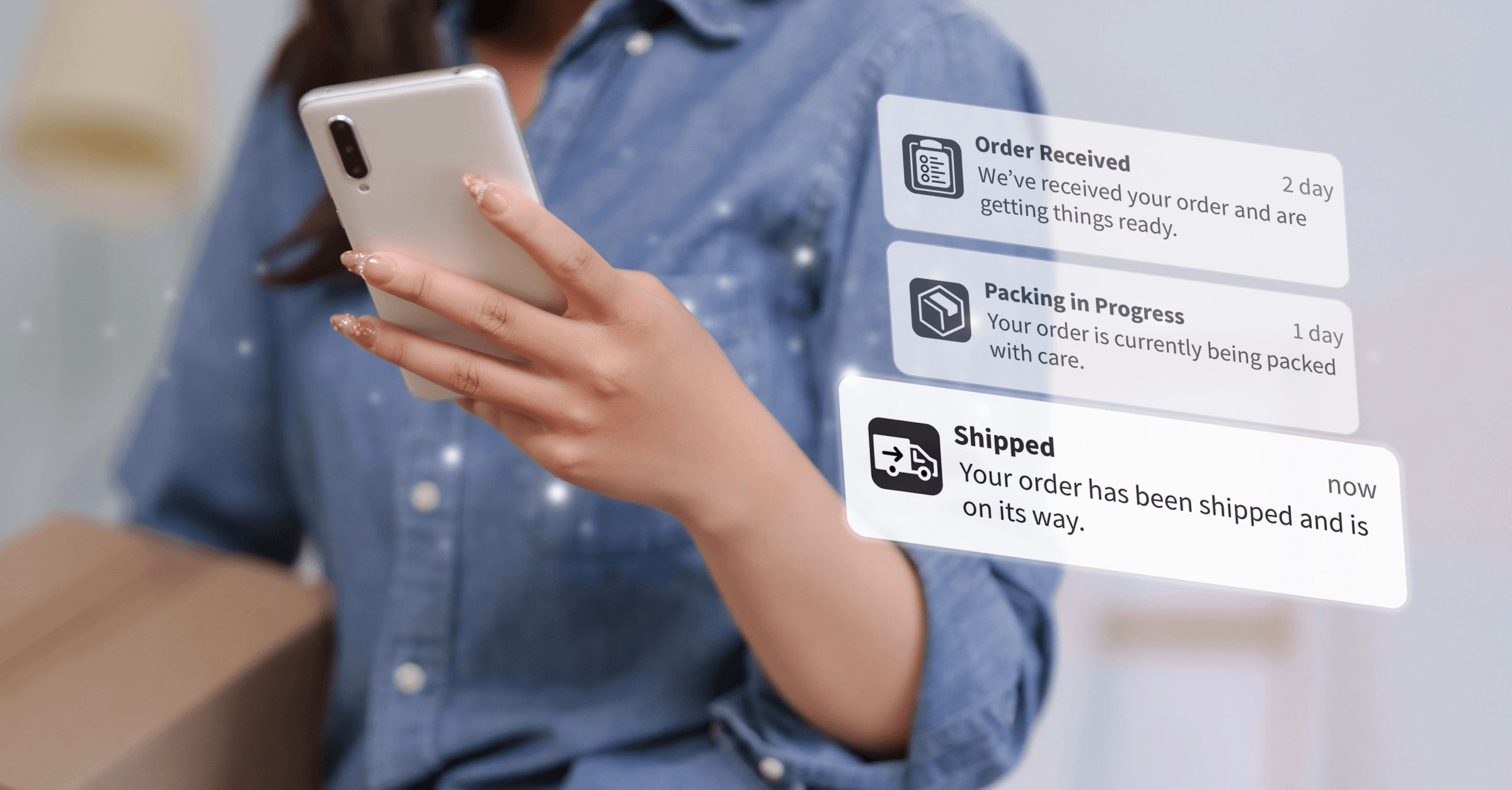
The solution is to send more (but not too many) shipping updates, each containing tracking information and helpful information that builds anticipation. Consider these six post-purchase notifications:
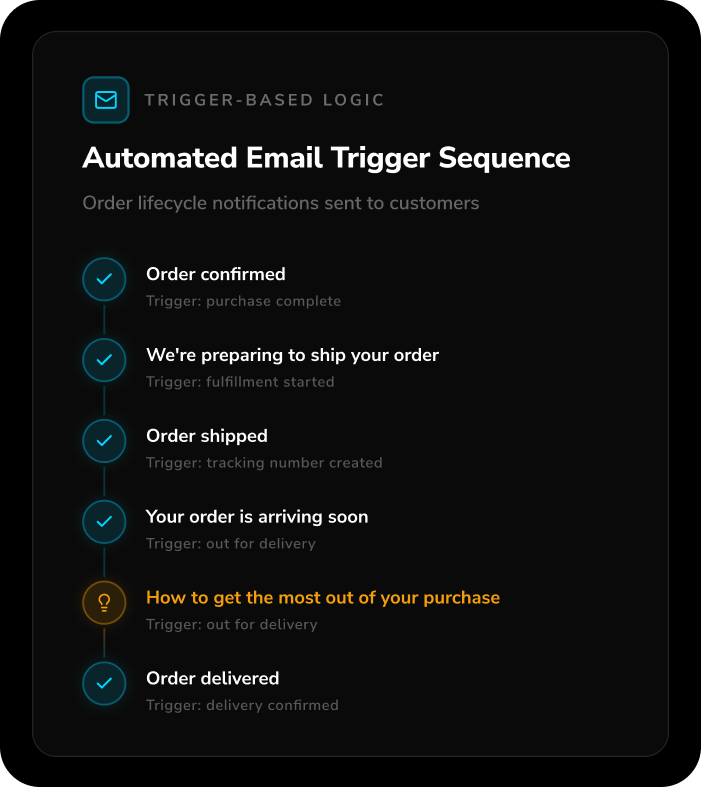
From “Order Shipped” onward, each message should contain tracking information. The optional “How to get the most out of your purchase” message can include care instructions, a user guide, and links to complementary products.
With this message cadence, shoppers won’t have to mine their feeds for earlier messages. They’ll also enjoy knowing you “care” about their order and their experience between ordering and delivery.
Pain point #4: Asking prematurely for a review
Positive online reviews drive conversions, but you can’t be too eager to gather them. Suppose you send an automated email with the subject line “How did you like your purchase?,” but the package is still in transit, delayed, lost, or damaged.
You’ve just shown the customer that automation is more important than personalization. And you’ve created a pain point that might lead to negative reviews.
The solution: Trigger-based logic
Trigger-based logic will help you avoid asking prematurely for a review. It’s the opposite of time-based email delays, in which you automatically send a message after a specific number of days. With trigger-based logic, review requests will go out when conditions like the following have been met: "Send review request five days after status = Delivered."
For trigger-based logic to work, the first step is integrating your ecommerce provider with your fulfillment software and email marketing platform. Shopify offers its users access to a fulfillment network, complete with the integrations necessary to enable trigger-based logic. Shopify also integrates with ESPs like Klaviyo and Mailchimp.
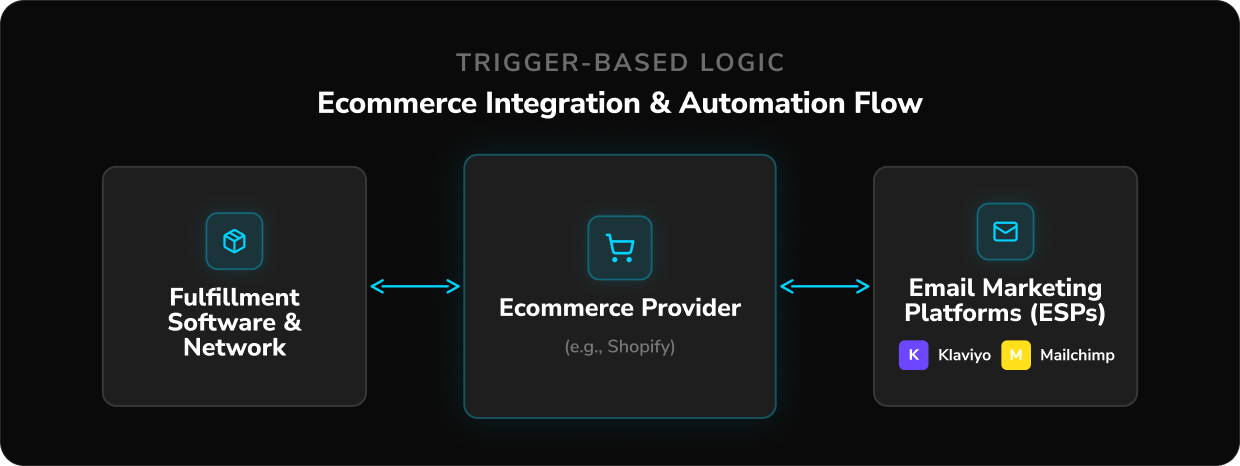
But sending a review request using trigger-based logic can still backfire if the product gets stolen or damaged during transit.
A better strategy is sending a package status check a day or so after delivery: "Did everything arrive safely? Let us know if there are any issues." If the customer responds with “Yes, arrived safely” or doesn’t respond, then you can send a review request.
Pain point #5: “No reply” transactional emails
One of the worst times to sever communication with the customer is when you send the order confirmation email. This is the moment when some customers realize they’ve made a mistake. They may have accidentally chosen the wrong size, color, or model. Or they suddenly realize they’ll be out of town on the expected delivery date and need to change the shipping address.
If you send order confirmations from an unmonitored address like noreply@brand.com, you’ll miss frantic replies to these emails. You force the customer to navigate to your site’s knowledge base, hunt for a "Contact Us" page, fill out a form, and pray your live chat is online. This can take a long time, with the customer fearing you won’t see the submitted form until it’s too late.
The solution: Automated transactional email routing
No transactional email should come from an unmonitored address. But that doesn’t mean you have to pay a human to read every single reply.
If you connect your transactional email address to a helpdesk like Gorgias or Zendesk, you can set up rules to filter out customer replies like “Thanks” or “Excited to get this!” But if a shopper frantically types "WRONG ADDRESS," you can also set up a rule that routes such emails to a customer service representative.
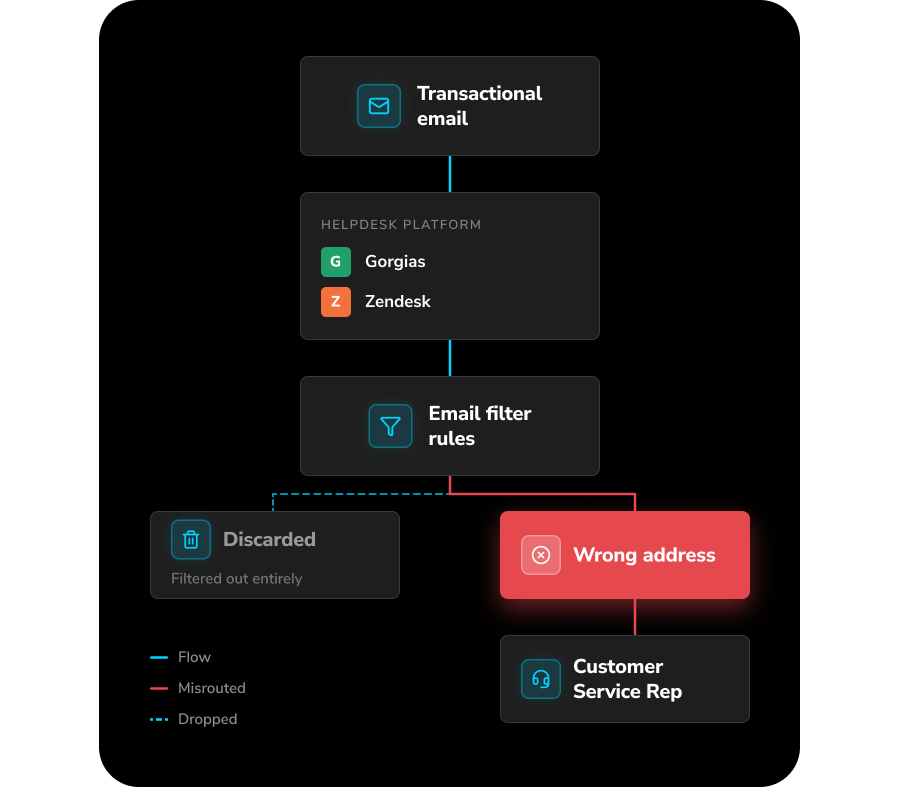
Another tactic to reassure customers is to add a footer to your transactional emails that says, "Questions? Just hit reply. We're here to help.” This small addition helps forge an emotional connection with shoppers that’s built on convenience.
Pain point #6: “One size fits all” returns
Few ecommerce experiences are more rife with major pain points than returns. Things like forcing customers to print a return label or making them search endlessly on your website for your return policy can hurt customer loyalty and reduce lifetime value. But one often overlooked return pain point is applying the same policy to every customer.
Suppose you don’t charge restocking fees (another pain point), but you only grant store credits for returns, not refunds. You might think, “Technically, the shopper is getting their money back, and with fraud so prevalent, store credits are an easy way to safeguard revenue.”
The reality is that most customers don’t think that way. In 2025 research from the National Retail Federation, 76% of surveyed consumers said they’re “more likely to choose a return option that provides an instant refund or exchange.”
The solution: Personalized returns
So how do you protect your business from fraud without penalizing returners who might deserve an instant refund based on their lifetime value? Offer personalized returns with the help of software partners like Extend.
Extend uses customer data and an AI-powered fraud detection model to assign customers into various segments and determine which deserve a more generous return policy. Here are some examples of those categories:
- Loyalty program members with a high LTV might get the choice of an automatic refund or exchange.
- Current customers with little purchase history but no fraud risk could receive an enhanced store credit. For example, if they’re due a $100 credit, make it $115 to offset any disappointment about not getting a refund. Plus they have a further incentive to purchase from your store.
- Customers with moderate fraud risk would get a standard store credit.
- Customers with high fraud risk would not be able to return a purchase.
Personalized returns won’t please 100% of the customers who request one. Some will always want a refund, even if their fraud risk level makes this option impossible. But you’ll likely please vastly more with personalized returns than without them.
Start fixing overlooked customer pain points with Extend
The often overlooked pain points mentioned above shouldn’t require a total reconfiguration of your tech stack. But by adding Extend, you’ll make the post-purchase user experience feel even more frictionless.
For more information about Extend or to arrange a free demo, click here.

Aaron Sullivan is content and copy director at Extend. He specializes in writing about e-commerce, finance, entertainment, and B2B SaaS.